
Quick Summary
The TP-Link Tapo S515 Smart Wi-Fi Light Switch is a feature-rich upgrade for homeowners who want to bring traditional lighting into a modern smart home without giving up convenient physical control. Designed for U.S. electrical systems, the S515 supports single-pole, 3-way, and 4-way configurations while adding remote app control, voice commands, schedules, timers, Away Mode, Matter compatibility, and energy monitoring. That combination makes it much more than a basic smart switch because it can become part of a broader home-automation setup.
What makes the Tapo S515 particularly appealing is its focus on compatibility and everyday convenience. You can control connected lights through the Tapo app, integrate the switch with Matter-compatible ecosystems, use Alexa, Google Assistant, or Apple Siri for voice control, and create routines around your daily schedule. With a 15A general-use rating, a flame-retardant enclosure, local control capabilities, and support for multi-way lighting, the S515 is designed to provide a practical smart-home upgrade for American households.
Table of Contents
- What Is the TP-Link Tapo S515?
- Key Features at a Glance
- Modern Smart Switch Design
- Matter Compatibility
- Alexa, Google Assistant, and Apple Home
- 3-Way and 4-Way Lighting Support
- Single-Pole Installation Compatibility
- Tapo App Control
- Remote Control From Anywhere
- Local Control
- Smart Scheduling
- Auto-Off Timers
- Away Mode
- Energy Monitoring
- Energy Usage Insights
- Zero-Crossing Technology
- 2.4GHz Wi-Fi Connectivity
- Physical Control and Everyday Convenience
- Safety-Focused Construction
- Electrical Capacity
- Smart Home Automation
- Family and Household Sharing
- Bedroom Lighting Applications
- Living Room Lighting Applications
- Kitchen and Hallway Lighting
- Outdoor and Garage Lighting Considerations
- Installation Requirements
- Who Should Buy the Tapo S515?
- Who May Want a Different Smart Switch?
- Pros and Cons
- How to Get the Most From the Tapo S515
- Is the Tapo S515 Worth Buying?
- Final Smart-Home Perspective
- Frequently Asked Questions
1. What Is the TP-Link Tapo S515?
The TP-Link Tapo S515 is a smart Wi-Fi light switch designed to replace compatible traditional wall switches and bring connected lighting into a smart-home environment.
Instead of simply turning a light on or off from the wall, the S515 allows you to add digital controls and automation. Once properly installed and connected, you can manage compatible lighting through the Tapo app, voice assistants, schedules, timers, and supported smart-home platforms.
Furthermore, the S515 is designed around Matter, an important smart-home standard intended to make compatible devices easier to integrate across different ecosystems.
That means the switch can make sense for homeowners who already use Tapo devices as well as people building a broader smart home around Apple Home, Amazon Alexa, Google Assistant, or Samsung SmartThings.
2. Key Features at a Glance
The Tapo S515 combines several useful features into one wall switch:
- Matter-certified smart switch
- 2.4GHz Wi-Fi connectivity
- Bluetooth for setup
- 3-way support
- 4-way support
- Single-pole support
- Tapo app control
- Remote control
- Local control
- Voice control
- Apple Home compatibility
- Amazon Alexa compatibility
- Google Assistant compatibility
- Samsung SmartThings compatibility
- Energy monitoring
- Energy-use insights
- Energy-cost estimates through the Tapo app
- Custom schedules
- Auto-off timers
- Away Mode
- Smart scenes
- Flame-retardant enclosure
- 15A general-use rating
- 600W incandescent rating
With this feature set, the S515 positions itself as a flexible smart-lighting upgrade rather than a simple Wi-Fi switch.
3. Modern Smart Switch Design
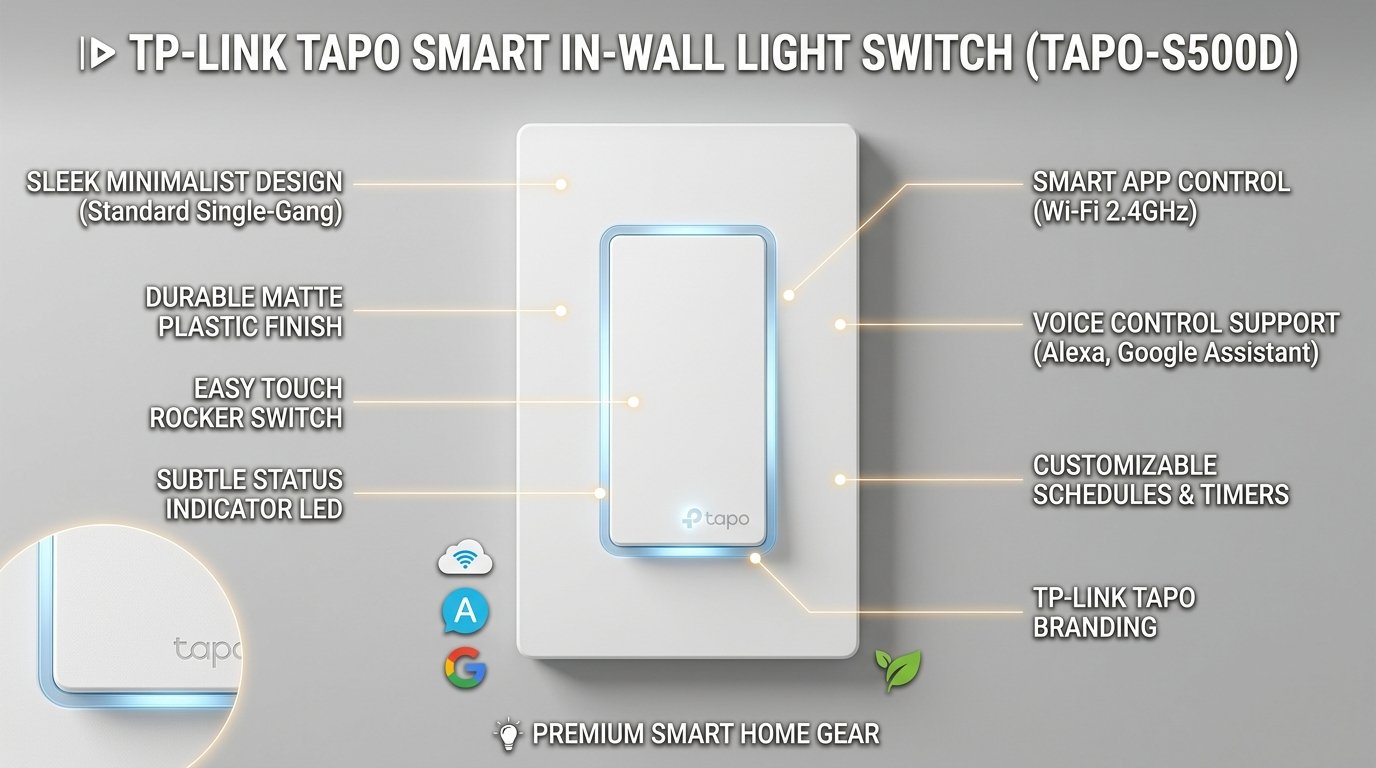
The Tapo S515 has a clean wall-switch appearance that fits naturally into modern homes.
Its design is intentionally familiar. You still have a physical switch that can be controlled from the wall, but the electronics behind it add smart functionality.
This approach is important because smart-home technology should not make basic control more complicated.
If someone in your household does not use smartphone apps or voice assistants, the physical switch remains useful. Meanwhile, other household members can take advantage of remote control and automation.
The result is a practical balance between traditional lighting control and modern smart-home functionality.
4. Matter Compatibility
Matter is one of the biggest reasons to consider the Tapo S515.
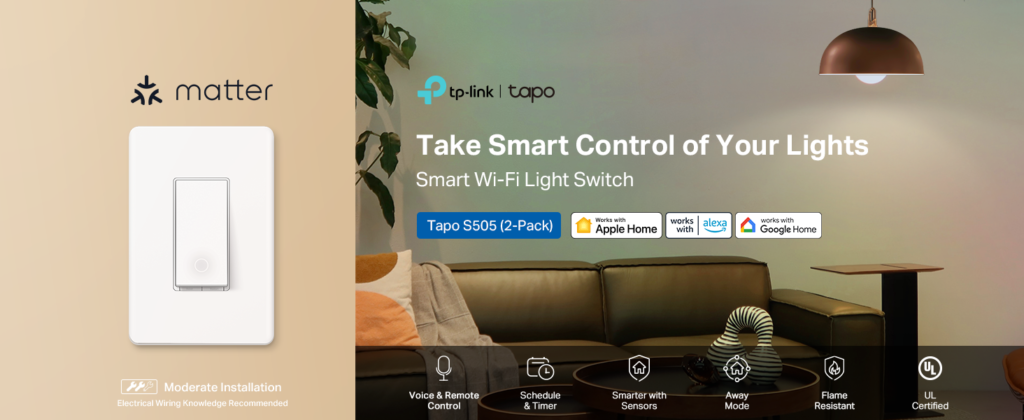
Matter is designed to improve compatibility between smart-home products from different manufacturers. Rather than forcing homeowners to build their entire smart home around one brand, Matter provides a standardized way for compatible devices to communicate with supported platforms.
For homeowners, this can provide greater flexibility when expanding a smart home.
The S515 is Matter-certified, allowing it to participate in supported Matter ecosystems.
However, Matter features can depend on the ecosystem and compatible controller or hub being used. Therefore, shoppers should check their specific smart-home platform before purchasing.
Still, Matter support gives the S515 a strong foundation for a modern connected home.
5. Alexa, Google Assistant, and Apple Home
Voice control can make smart lighting much more convenient.
The Tapo S515 supports major smart-home ecosystems, including Amazon Alexa, Google Assistant, and Apple Home through Siri.
That means you can integrate your lighting into the voice-control system you already use.
For example, instead of reaching for your phone when you are relaxing in the living room, you can use a supported voice assistant to control the connected light.
Similarly, smart-home routines can combine lighting with other compatible devices.
This makes the S515 particularly appealing to homeowners who already have smart speakers or smart-home controllers.
If you want to upgrade a compatible wall switch with Matter, app control, and voice functionality, Check Price on Amazon to see the current price and availability of the Tapo S515.
6. 3-Way and 4-Way Lighting Support
One of the strongest features of the Tapo S515 is its support for 3-way and 4-way lighting configurations.
This is especially useful in American homes where a single light may be controlled from multiple locations.
For example, a hallway light may have controls at different ends of the hallway. Likewise, a staircase can use multiple switches so that the light can be controlled from different floors.
The S515 is designed to work in these multi-location configurations, giving homeowners a way to introduce smart functionality without abandoning the convenience of multi-way lighting.
However, the installation requirements are important. The S515 requires a neutral wire, and TP-Link specifies where the smart switch should be placed within supported multi-way circuits.
Because this involves household mains electricity, installation should be handled by a qualified electrician when you are not fully comfortable with the electrical requirements.
7. Single-Pole Installation Compatibility
The S515 is not limited to multi-way lighting.
It also supports compatible single-pole circuits, making it suitable for many standard lighting locations.
This gives homeowners greater flexibility when planning a smart-home upgrade.
You can use the switch in a conventional lighting location while still gaining access to smart controls and automation.
Therefore, whether you are upgrading one important light or gradually modernizing multiple rooms, the S515 can fit several common residential configurations.
8. Tapo App Control
The Tapo app serves as one of the main control centers for the switch.
Through the app, homeowners can manage connected lighting, configure schedules, create scenes, monitor energy information, and access additional smart-home functions.
This creates a more centralized approach to home automation.
Instead of installing separate apps for every smart device, you can use the Tapo ecosystem to manage compatible Tapo products together.
For households already using Tapo smart plugs, sensors, cameras, bulbs, or other compatible devices, this can make automation more convenient.
9. Remote Control From Anywhere
Remote control is one of the most practical smart-switch features.
A traditional wall switch requires you to physically be at the switch. The Tapo S515 adds the ability to control the connected light remotely through the Tapo app.
That can be useful when you leave home and realize that a light was left on.
It can also be useful when you want to turn on a light before entering a room.
For everyday convenience, remote control eliminates many small frustrations associated with manually controlled lighting.
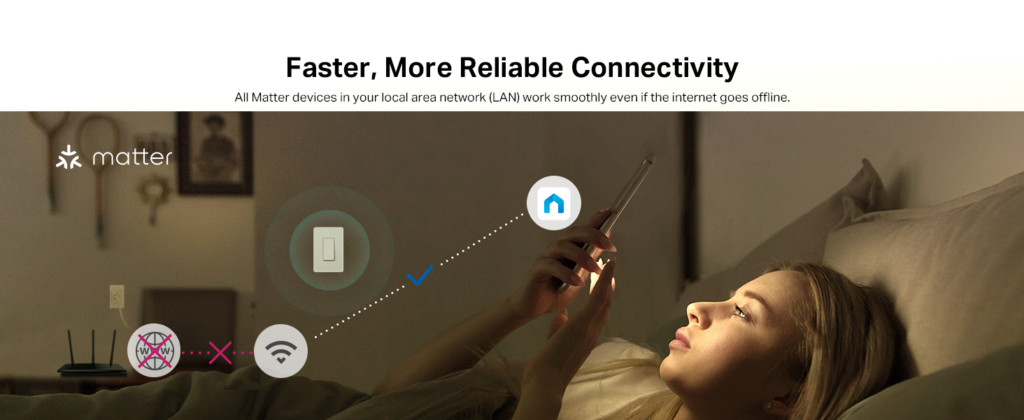
10. Local Control
Another important feature is local control.
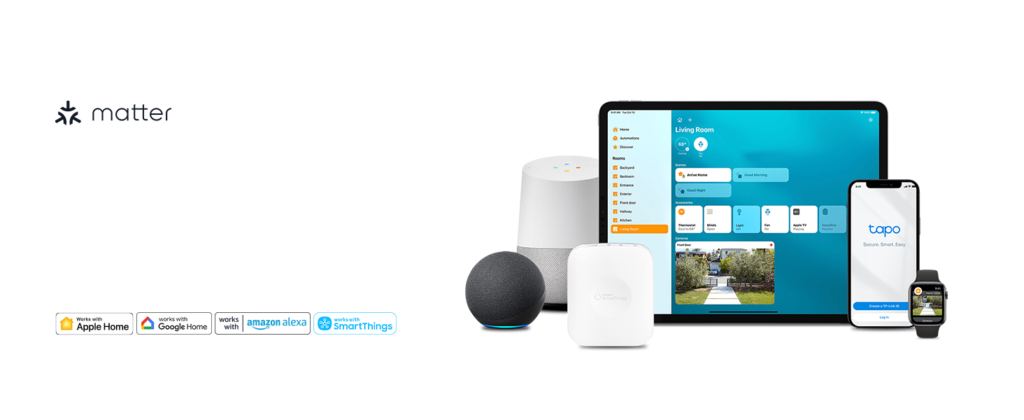
According to TP-Link, compatible connected devices can remain accessible on the local network through the Tapo app or other supported Matter smart-home controllers even when the household internet connection goes offline.
This is valuable because smart-home reliability should not depend entirely on an external internet connection.
Local functionality can help maintain responsiveness within the home network while providing an additional layer of convenience.
The exact behavior can depend on the platform and configuration, but the S515’s local-control support is a useful feature for smart-home enthusiasts.
11. Smart Scheduling
Scheduling is one of the easiest ways to turn a smart switch into an automation tool.
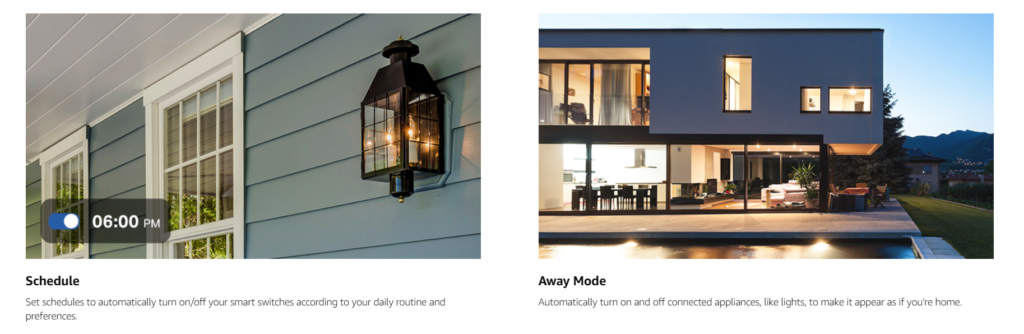
With the Tapo S515, you can create schedules that automatically control connected lighting according to your routine.
For example, a homeowner might schedule an entryway light to turn on around the time people normally arrive home.
You could also create evening lighting schedules or automatically turn lights off at night.
The important advantage is consistency.
Once the schedule is configured, the switch can handle the routine automatically rather than relying on someone to remember every day.
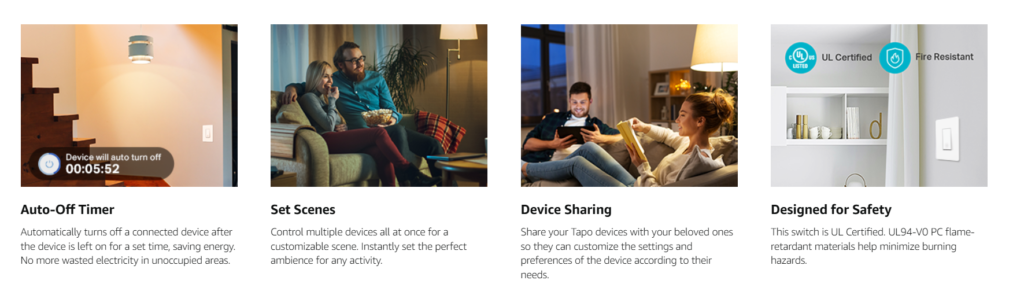
12. Auto-Off Timers
Auto-off functionality adds another useful layer.
Instead of creating a specific daily schedule, you can configure an automatic shutoff after a chosen period when supported by the Tapo software.
This can be useful in areas where lights are frequently forgotten.
Hallways, utility areas, bathrooms, and similar spaces can benefit from automatic shutoff routines.
Consequently, the S515 can help reduce unnecessary lighting runtime while also making everyday household management easier.
13. Away Mode
Away Mode is designed to create the appearance that someone is home while you are away.
The switch can randomly turn connected lights on and off at different times.
This is different from a predictable schedule.
A fixed schedule may turn a light on at exactly the same time every evening. Away Mode instead creates a less predictable lighting pattern.
For homeowners who travel, this provides another smart-home automation option.
It is important to view Away Mode as a convenience feature rather than a guarantee of security. It can make a home appear occupied, but it should not replace appropriate home-security measures.

14. Energy Monitoring
Energy monitoring is another major advantage of the S515.
Rather than simply controlling the light, the switch can provide information about energy consumption through the Tapo app.
This allows homeowners to see how much energy a connected load uses and better understand their household’s electricity patterns.
For people interested in smart-home efficiency, this information can be valuable.
Instead of guessing how much a device or lighting circuit contributes to energy use, you can use available data to make more informed decisions.
15. Energy Usage Insights
The Tapo app can present energy information in an easier-to-understand format.
The system can provide usage information and energy-cost estimates when you configure your electricity rate.
This can help homeowners identify patterns.
For instance, you may discover that certain lighting is frequently left on for longer than expected.
The goal is not necessarily to eliminate lighting use. Instead, the information can help you understand your habits and make practical adjustments.
One important consideration is that TP-Link notes that energy monitoring is not yet supported by most Matter-enabled apps, so the Tapo app is the place to use this feature for now.
16. Zero-Crossing Technology
The S515 also includes zero-crossing detection technology.
According to TP-Link, this technology is designed to reduce relay contact welding and can help extend the switch’s lifespan under applicable conditions.
TP-Link reports a laboratory-based lifespan improvement claim of more than nine times, but actual results can vary depending on working conditions and environments.
That distinction is important.
You should treat the technology as a durability-oriented design feature rather than assume a guaranteed lifespan.
Nevertheless, incorporating zero-crossing technology demonstrates that the S515 is designed with more than basic connectivity in mind.
17. 2.4GHz Wi-Fi Connectivity
The Tapo S515 uses 2.4GHz Wi-Fi.
This is common for smart-home devices because 2.4GHz networks generally provide useful range through walls and across residential spaces.
The switch also uses Bluetooth for setup.
Before purchasing, confirm that your home network and smart-home configuration are compatible with the device requirements.
Once connected, the S515 can communicate with the Tapo ecosystem and supported smart-home platforms.
For most typical residential smart-home environments, 2.4GHz connectivity is a familiar and practical approach.
18. Physical Control and Everyday Convenience
Smart functionality should never eliminate simple physical control.
The Tapo S515 keeps a physical interface so household members can continue controlling the connected light directly from the wall.
This matters in homes where multiple people have different technology preferences.
One person may prefer Alexa. Another may use Apple Home. Someone else may simply press the wall switch.
The S515 accommodates all of these approaches.
That flexibility is one of the product’s strongest everyday advantages.
19. Safety-Focused Construction
The S515 uses a flame-retardant PC material designed to meet UL94-V0 material requirements.
It is also listed with UL certification and other compliance markings.
These features are important for an electrical device installed inside a wall box.
However, certified construction does not eliminate installation risks.
Correct installation remains essential, and homeowners should not treat smart-switch installation as a casual DIY electronics project.
If you are unsure about the electrical configuration, use a qualified electrician.
20. Electrical Capacity
The Tapo S515 is rated for 100–120V at 50/60Hz.
TP-Link lists a maximum load of 15A for general use and 600W for incandescent lighting.
This makes it suitable for many standard residential lighting applications, provided the connected load falls within the manufacturer’s specifications.
However, you should always verify the load type and rating before installation.
Do not assume that every electrical device or lighting setup is automatically compatible simply because it uses a wall switch.
21. Smart Home Automation
The S515 becomes even more useful when combined with other smart-home devices.
For example, compatible sensors can trigger smart actions.
A motion sensor could potentially be part of an automation that controls lighting in a suitable area.
Similarly, you can create scenes that coordinate multiple smart devices.
This means the S515 can serve as one component of a broader smart-home system rather than functioning as an isolated switch.
For homeowners gradually building automation throughout their property, that scalability is valuable.
22. Family and Household Sharing
Smart-home control becomes more useful when multiple household members can access it.
Matter’s multi-admin capability can help compatible devices participate across supported platforms and accounts.
This is especially convenient in a family environment.
Instead of tying lighting control to one person’s phone, the smart-home setup can be shared according to the capabilities of the selected ecosystem.
That makes the S515 a more practical choice for shared households.
23. Bedroom Lighting Applications
Bedroom lighting is an excellent use case.
You can use the physical switch normally while also creating schedules or voice controls.
For example, a scheduled lighting routine can help automate evening or morning lighting.
Likewise, remote control can be convenient when you want to switch a connected light off without getting out of bed.
These small conveniences can add up over time.
24. Living Room Lighting Applications
The living room is another natural location.
The S515 can turn ordinary room lighting into part of a smart-home scene.
You could coordinate lighting with other compatible devices, create schedules, or use voice commands.
This is particularly useful when the room contains multiple smart products.
Instead of treating lighting as a separate system, the S515 allows it to become part of the overall connected environment.
25. Kitchen and Hallway Lighting
Kitchens and hallways can benefit from automation because these areas are often used repeatedly throughout the day.
A scheduled light can follow a predictable routine.
An auto-off timer can help reduce situations where lights remain on unnecessarily.
In a hallway, multi-way support can also be valuable because lighting may already be controlled from multiple locations.
The S515 therefore fits several practical residential scenarios.
26. Outdoor and Garage Lighting Considerations
The S515 can be useful for appropriate indoor-controlled lighting circuits connected to garages or covered areas, provided the electrical load and installation environment meet the manufacturer’s specifications.
However, the S515 itself is not an outdoor-rated switch.
Therefore, do not treat it as a weatherproof outdoor device.
If you are planning an installation in an exposed outdoor location, select equipment specifically rated for that environment.
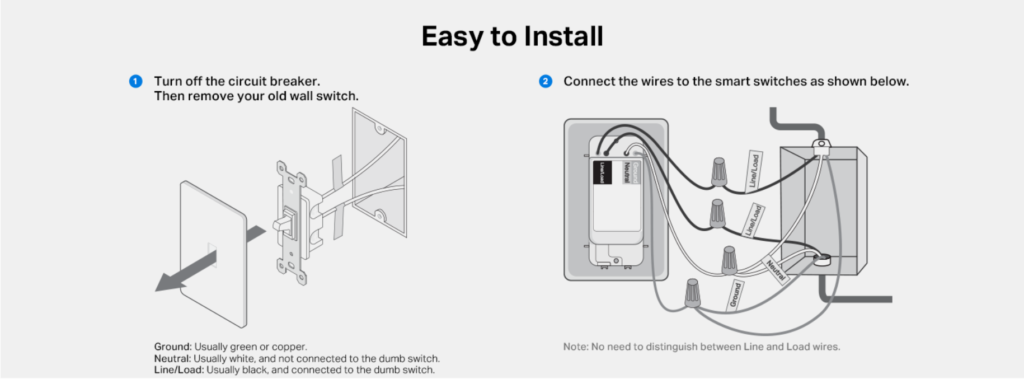
27. Installation Requirements
The Tapo S515 requires a neutral wire and must be installed in a compatible electrical circuit.
The exact installation arrangement depends on whether your home uses a single-pole, 3-way, or 4-way configuration.
This is an important purchasing consideration.
Before buying, determine whether your intended switch location has the required wiring and whether the circuit is compatible.
Because the switch operates on household mains voltage, installation should be performed by a qualified electrician if you are not trained and comfortable working with residential electrical systems.
The smart features are convenient, but safe installation comes first.
28. Who Should Buy the Tapo S515?
The Tapo S515 is particularly well suited to homeowners who want:
- Matter-compatible smart-home equipment
- Remote lighting control
- Voice control
- Tapo app integration
- Alexa compatibility
- Google Assistant compatibility
- Apple Home integration
- Smart schedules
- Away Mode
- Energy monitoring
- Multi-way lighting support
- Local smart-home control
- A physical wall-switch interface
It is especially attractive if you are already building a Tapo ecosystem.
29. Who May Want a Different Smart Switch?
The S515 may not be ideal for every situation.
For example, if your home does not have a neutral wire at the intended location, you will need a different compatible solution.
Likewise, homeowners specifically looking for dimming functionality should consider a Tapo dimmer model rather than this on/off switch.
The S515 is also not intended to replace every type of electrical control.
Its strongest use case is compatible residential lighting where smart on/off control is the main objective.
30. Pros and Cons
Pros
- Matter certified
- Supports Apple Home
- Works with Alexa
- Works with Google Assistant
- Supports SmartThings
- 3-way compatible
- 4-way compatible
- Single-pole compatible
- Energy monitoring
- Remote app control
- Local control
- Smart scheduling
- Auto-off functionality
- Away Mode
- Flame-retardant construction
- 15A general-use rating
- Physical wall control
Cons
- Requires a neutral wire
- Requires compatible electrical wiring
- Uses 2.4GHz Wi-Fi
- Installation involves household mains electricity
- Energy monitoring is currently most useful through the Tapo app
- It is an on/off switch rather than a dimmer
- Compatibility and Matter features can vary by ecosystem
Overall, the feature list strongly favors homeowners who want a flexible smart-lighting platform.
31. How to Get the Most From the Tapo S515
Start by confirming compatibility before purchasing.
Check the type of circuit, required wiring, electrical load, and smart-home ecosystem you intend to use.
After professional installation, connect the switch to the appropriate Tapo and smart-home environment.
Then build your automation gradually.
Start with a simple schedule.
Next, experiment with voice control.
Afterward, explore Away Mode, scenes, energy monitoring, and compatible sensor-triggered automation.
By introducing features one at a time, you can build a smart-home system that remains practical instead of unnecessarily complicated.
32. Is the Tapo S515 Worth Buying?
The Tapo S515 offers a strong combination of smart-home compatibility, practical automation, and traditional physical control.
Its Matter certification is particularly useful for homeowners who want more flexibility when choosing a smart-home ecosystem.
Meanwhile, 3-way and 4-way support makes it more versatile than a basic single-pole smart switch.
Energy monitoring adds another useful layer, while schedules, timers, Away Mode, remote control, and voice commands make everyday lighting more convenient.
The requirement for a neutral wire is an important limitation, but it is clearly part of the installation requirements.
For a compatible U.S. residential circuit, the S515 provides a compelling way to modernize traditional lighting.
33. Final Smart-Home Perspective
The TP-Link Tapo S515 is designed for homeowners who want smart lighting without abandoning the familiar wall switch.
Its combination of Matter compatibility, multi-way support, energy monitoring, remote access, voice control, schedules, timers, and local control gives it a broad range of practical applications.
More importantly, these features work together.
You are not simply purchasing a Wi-Fi-controlled switch. You are adding a controllable lighting point that can participate in a larger smart-home environment.
For households already using Tapo products, the integration becomes even more attractive.
For newcomers, Matter support provides a useful foundation for gradually building a cross-platform smart home.
If your electrical setup is compatible and you want a smart on/off switch rather than a dimmer, the Tapo S515 is a highly capable option worth considering.
Check Price on Amazon to review the current Tapo S515 availability and confirm that the listed configuration matches your intended smart-home setup before purchasing.
34. Frequently Asked Questions
1. What is the TP-Link Tapo S515?
The Tapo S515 is a Matter-certified smart Wi-Fi light switch designed for compatible U.S. residential electrical systems. It adds app control, voice control, schedules, timers, Away Mode, energy monitoring, and smart-home integration to compatible lighting circuits.
2. Does the Tapo S515 support Matter?
Yes. The Tapo S515 is Matter certified and can integrate with supported Matter-compatible smart-home ecosystems.
3. Does Tapo S515 work with Alexa?
Yes. The S515 supports Amazon Alexa voice control.
4. Does Tapo S515 work with Google Assistant?
Yes. Google Assistant is supported for compatible voice-control functionality.
5. Does Tapo S515 work with Apple Home?
Yes. TP-Link lists Apple Home compatibility for the S515.
6. Does Tapo S515 support Samsung SmartThings?
Yes. Samsung SmartThings is listed among the supported third-party platforms.
7. Does the Tapo S515 support 3-way switches?
Yes. The S515 supports compatible 3-way lighting configurations.
8. Does it support 4-way lighting?
Yes. The S515 is designed to support compatible 4-way circuits.
9. Can it be used as a single-pole switch?
Yes. The S515 supports compatible single-pole circuits as well as 3-way and 4-way configurations.
10. Does the Tapo S515 require a neutral wire?
Yes. TP-Link specifies that a neutral wire is required.
11. Does the Tapo S515 require Wi-Fi?
Yes. The switch uses 2.4GHz Wi-Fi for its network connection. Bluetooth is used for setup.
12. Can I control the Tapo S515 remotely?
Yes. The Tapo app provides remote control functionality, allowing compatible connected lighting to be controlled through the app.
13. Can I control it without the internet?
The S515 supports local control through the local network and compatible Matter control centers. Exact functionality can depend on your smart-home configuration.
14. Does the Tapo S515 monitor energy?
Yes. Energy monitoring is one of the product’s major features. The Tapo app can provide energy-use information and support electricity-cost estimates when configured appropriately.
15. Can Matter apps display the S515’s energy information?
TP-Link notes that energy monitoring is not currently supported by most Matter-enabled apps, so the Tapo app should be used for this functionality.
16. Does the Tapo S515 have Away Mode?
Yes. Away Mode can randomly control connected lighting to create the appearance that someone is home.
17. Can I schedule the Tapo S515?
Yes. You can configure schedules to automatically control compatible connected lighting according to your routine.
18. Does it have an auto-off timer?
Yes. The S515 supports automatic shutoff timer functionality through its smart-home features.
19. Is the Tapo S515 a dimmer?
No. The S515 is a smart on/off light switch. If you need brightness adjustment, you should look at a compatible Tapo dimmer model instead.
20. What is the maximum load?
TP-Link lists the S515 at 15A for general use and 600W for incandescent lighting. Always verify the connected load against the manufacturer’s specifications before installation.
21. Is the Tapo S515 safe?
The switch uses flame-retardant material and carries listed safety certifications. However, safe operation also depends on correct installation and use within its specified electrical ratings.
22. Can I install it myself?
Installation involves household mains electricity. If you are not qualified and fully comfortable working with residential electrical wiring, use a qualified electrician rather than attempting the installation yourself.
23. Is the Tapo S515 suitable for a smart-home beginner?
Yes, provided the electrical installation is handled correctly. Its combination of physical control, app control, voice assistants, Matter compatibility, schedules, and automation makes it a flexible starting point for smart lighting.
24. Is the Tapo S515 worth buying?
For a compatible electrical setup, the Tapo S515 offers an impressive combination of smart-home compatibility and practical lighting features. Its Matter support, multi-way capability, energy monitoring, remote control, scheduling, and voice functionality make it a versatile choice for homeowners looking to modernize traditional lighting.
Check Price on Amazon to see the current listing, pricing, and availability before choosing the Tapo S515 for your smart-home project.